Unified Test Reports (Browser + API)
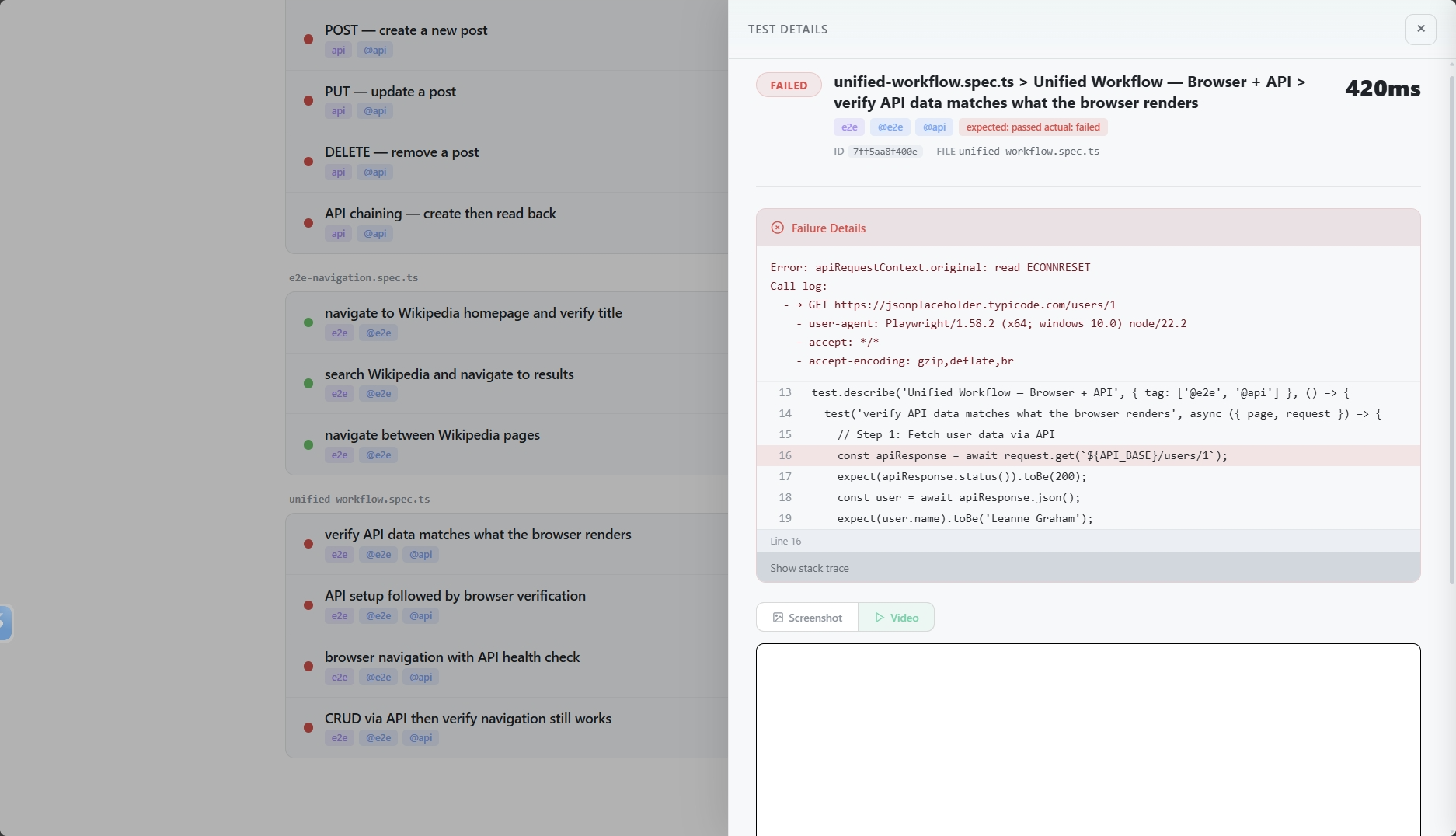
Unified test reports combine browser navigation analytics and API test results in a single JSON file. When you write tests that use both page and request fixtures, TestRelic captures both navigation timelines and test outcomes together.
What does a unified report contain?
When you run unified tests with TestRelic, the same JSON report captures:
- Navigation Timeline — Every URL visited, navigation type, duration, and network statistics
- Test Results — Pass/fail/flaky/skipped status for every test, regardless of whether it used
page,request, or both - Failure Diagnostics — Error messages and source code snippets for any failing test
- CI Metadata — Auto-detected CI provider details
- Run Metadata — Test run ID, timestamps, and overall duration
What does the unified report schema look like?
Unified reports use the same top-level structure as all TestRelic reports:
{
  "schemaVersion": "1.0.0",
  "testRunId": "797128f5-c86d-466c-8d6d-8ec62dfc70b6",
  "startedAt": "2026-02-07T10:41:28.759Z",
  "completedAt": "2026-02-07T10:41:36.794Z",
  "totalDuration": 8035,
  "summary": {
    "total": 8,
    "passed": 7,
    "failed": 1,
    "flaky": 0,
    "skipped": 0
  },
  "ci": {
    "provider": "github-actions",
    "buildId": "12345678",
    "commitSha": "abc123def456",
    "branch": "main"
  },
  "timeline": [...]
}
Each entry in the timeline array captures a page navigation (if the test used page) along with the test results associated with it:
{
  "url": "https://en.wikipedia.org/wiki/Main_Page",
  "navigationType": "goto",
  "visitedAt": "2026-02-07T10:41:29.844Z",
  "duration": 890,
  "specFile": "tests/unified/wikipedia-api.spec.ts",
  "domContentLoadedAt": "2026-02-07T10:41:30.200Z",
  "networkStats": {
    "totalRequests": 40,
    "failedRequests": 0,
    "totalBytes": 1289736,
    "byType": {
      "document": 1,
      "script": 9,
      "stylesheet": 2,
      "image": 27,
      "font": 2,
      "xhr": 0,
      "other": 0
    }
  },
  "tests": [
    {
      "title": "tests/unified/wikipedia-api.spec.ts > search Wikipedia and validate API data",
      "status": "passed",
      "duration": 3456,
      "failure": null
    }
  ]
}
Top-level fields and timeline examples are covered in this guide. For browser-only reports, see Browser reports. For all reporter options, see Playwright Configuration or Appium Configuration.
What does each test result contain in a unified report?
| Field | Type | Description |
|---|---|---|
title | string | Full test title including file and suite |
status | string | Result: passed, failed, flaky, or skipped |
duration | number | Total test execution time in milliseconds (includes both API and browser time) |
failure | object | null | Error details if the test failed; null otherwise |
What does a failure in a unified test look like?
{
  "failure": {
    "message": "expect(received).toHaveText(expected)\n\nExpected: \"Leanne Graham\"\nReceived: \"\"",
    "snippet": {
      "file": "tests/unified/user-validation.spec.ts",
      "line": 18,
      "lines": [
        "  const user = await apiResponse.json();",
        "  await page.goto(`https://example.com/users/${user.id}`);",
        ">>> await expect(page.locator('.user-name')).toHaveText(user.name);",
        "});"
      ]
    },
    "stack": "Error: expect(received).toHaveText(expected)..."
  }
}
How do I analyze unified reports?
- For AI agents
- For Human
Read my TestRelic unified report at test-results/analytics-timeline.json and:
1. Print the test summary (total, passed, failed, flaky, skipped)
2. List all page navigations with the tests that ran on each page
3. Find any failed tests across both browser and API tests
4. Show the 5 slowest page navigations
Write a Node.js script using fs.readFileSync.
Write jq commands for my TestRelic unified report (test-results/analytics-timeline.json) to:
1. Print the summary
2. List all navigations with their associated test titles
3. Find all failed tests
4. Count how many tests ran on each unique URL
How do I query unified reports with jq?
# View summary
cat test-results/analytics-timeline.json | jq '.summary'

# List all navigations with their associated tests
cat test-results/analytics-timeline.json | jq '.timeline[] | {url, navigationType, tests: [.tests[].title]}'

# Find failed tests
cat test-results/analytics-timeline.json | jq '.timeline[].tests[] | select(.status == "failed")'

# Get network stats per page
cat test-results/analytics-timeline.json | jq '.timeline[] | {url, totalRequests: .networkStats.totalRequests, totalBytes: .networkStats.totalBytes}'

# Calculate average navigation duration
cat test-results/analytics-timeline.json | jq '[.timeline[].duration] | add / length'

# Find the spec file for failed tests
cat test-results/analytics-timeline.json | jq '
  .timeline[]
  | select(.tests[].status == "failed")
  | {specFile, url, tests: [.tests[] | select(.status == "failed") | .title]}
'
How do I analyze unified reports in Node.js?
const fs = require('fs');

const report = JSON.parse(
  fs.readFileSync('test-results/analytics-timeline.json', 'utf-8')
);

console.log('Summary:', report.summary);
console.log('Total duration:', report.totalDuration + 'ms');

// Analyze navigations
console.log('\nNavigations:');
report.timeline.forEach(entry => {
  console.log(`  ${entry.navigationType}: ${entry.url} (${entry.duration}ms)`);
});

// Find failed tests
const failed = report.timeline
  .flatMap(entry => entry.tests)
  .filter(t => t.status === 'failed');

if (failed.length > 0) {
  console.log('\nFailed tests:');
  failed.forEach(t => {
    console.log(`  - ${t.title}`);
    if (t.failure) console.log(`    Error: ${t.failure.message}`);
  });
}
How do I analyze unified reports in Python?
import json

with open('test-results/analytics-timeline.json', 'r') as f:
    report = json.load(f)

print(f"Summary: {report['summary']}")

# Navigation breakdown
print("\nNavigations:")
for entry in report['timeline']:
    nav_type = entry['navigationType']
    url = entry['url']
    duration = entry['duration']
    print(f"  {nav_type}: {url} ({duration}ms)")

# Test results
all_tests = [t for entry in report['timeline'] for t in entry['tests']]
failed = [t for t in all_tests if t['status'] == 'failed']

if failed:
    print(f"\nFailed tests ({len(failed)}):")
    for test in failed:
        print(f"  - {test['title']}")
        if test.get('failure'):
            print(f"    Error: {test['failure']['message']}")
What are the best practices for unified test reports?
How do I isolate API failures from browser failures?
Because both API calls and browser navigations are captured in the same test, check the failure snippet's file and line to determine which part of the test failed:
# See which tests failed and where in the code
jq '.timeline[].tests[] | select(.status == "failed") | {title, file: .failure.snippet.file, line: .failure.snippet.line}' \
  test-results/analytics-timeline.json
How do I track performance trends over time?
Archive reports with timestamps:
cp test-results/analytics-timeline.json \
   reports/$(date +%Y%m%d-%H%M%S)-unified.json
How do I integrate unified report analysis into CI/CD?
# .github/workflows/test.yml
- name: Run Unified Tests
  run: npx playwright test

- name: Check for failures
  run: |
    FAILED=$(jq '.summary.failed' test-results/analytics-timeline.json)
    if [ "$FAILED" -gt 0 ]; then
      echo "Unified tests failed: $FAILED"
      jq '.timeline[].tests[] | select(.status == "failed") | .title' \
        test-results/analytics-timeline.json
      exit 1
    fi
Where do I go next?
- 📖 Browser Report Structure — E2E report details
- 📖 API Report Structure — API report details
- 📖 Unified Testing Guide — Writing unified tests
- ⚙️ Playwright Configuration — Playwright reporter options
- ⚙️ Appium Configuration — Appium reporter options