API Test Reports
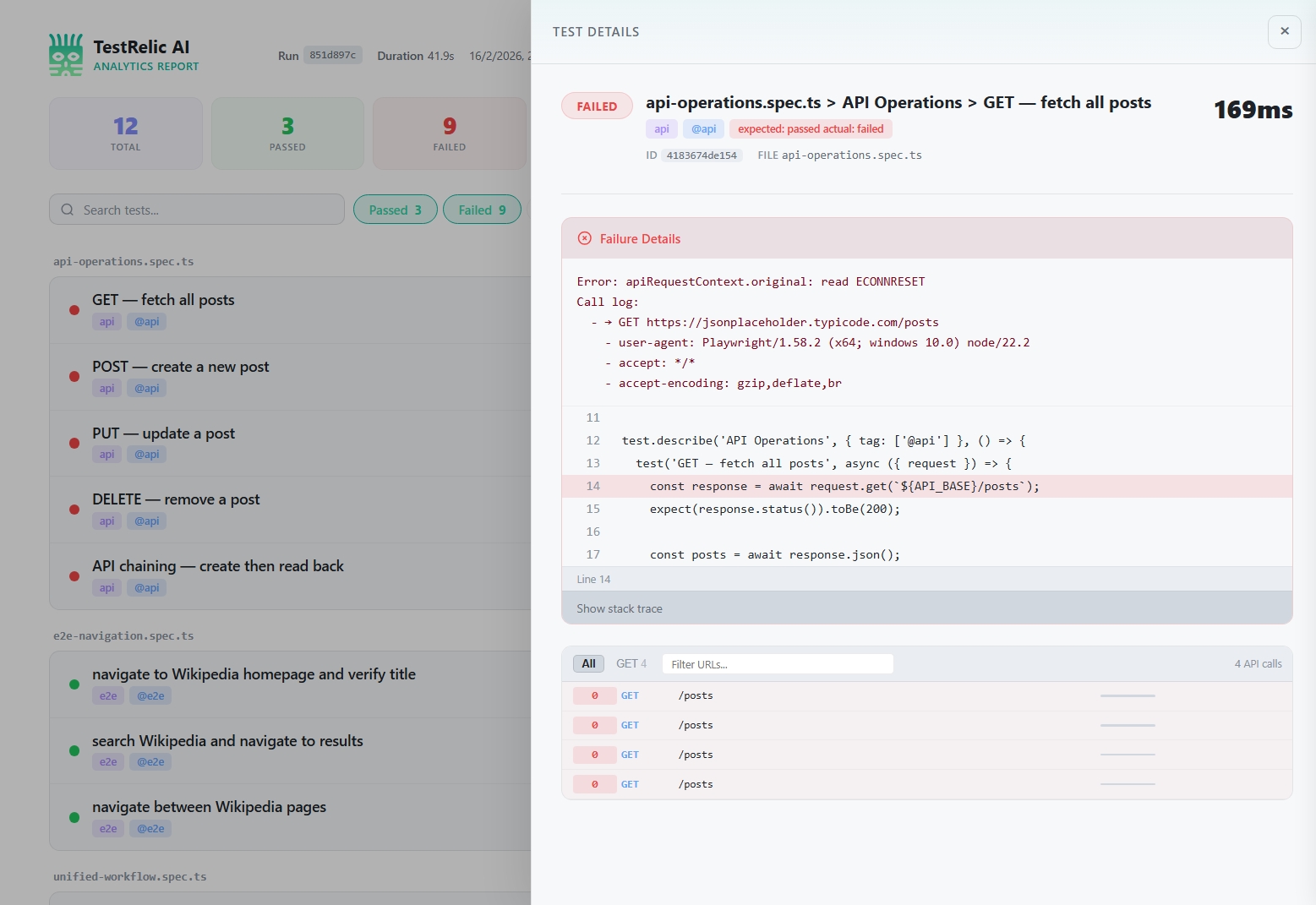
API test reports from TestRelic use the same JSON structure as browser reports. When you run tests using the testRelicApiFixture, test results, failure diagnostics, and timing are written to the same report file.
What does an API test report contain?
When you run API tests with TestRelic, the JSON report contains:
- Test Results — Pass/fail/flaky/skipped status and duration for every test
- Failure Diagnostics — Error messages, source code snippets pointing to the exact failure line, and optional stack traces
- CI Metadata — Auto-detected CI provider details
- Run Metadata — Test run ID, timestamps, and duration summary
What does the report schema look like?
The report uses the same top-level structure as all TestRelic reports:
{
  "schemaVersion": "1.0.0",
  "testRunId": "797128f5-c86d-466c-8d6d-8ec62dfc70b6",
  "startedAt": "2026-02-07T10:41:28.759Z",
  "completedAt": "2026-02-07T10:41:36.794Z",
  "totalDuration": 5234,
  "summary": {
    "total": 15,
    "passed": 13,
    "failed": 2,
    "flaky": 0,
    "skipped": 0
  },
  "ci": {
    "provider": "github-actions",
    "buildId": "12345678",
    "commitSha": "abc123def456",
    "branch": "main"
  },
  "timeline": [...]
}
For API tests, the timeline entries reflect the test file and test results rather than browser page navigations.
For complete top-level JSON examples, see Unified test reports. For all reporter options, see Playwright Configuration or Appium Configuration.
What does each test result contain?
Each tests array entry within a timeline entry includes:
| Field | Type | Description |
|---|---|---|
title | string | Full test title including file and suite |
status | string | Result: passed, failed, flaky, or skipped |
duration | number | Test execution time in milliseconds |
failure | object | null | Error details if the test failed; null otherwise |
What does a failure object look like for an API test?
{
  "failure": {
    "message": "expect(received).toBe(expected)\n\nExpected: 200\nReceived: 404",
    "snippet": {
      "file": "tests/api/posts.spec.ts",
      "line": 15,
      "lines": [
        "  const response = await request.get('/api/posts/999');",
        ">>> expect(response.status()).toBe(200);",
        "  const post = await response.json();"
      ]
    },
    "stack": "Error: expect(received).toBe(expected)..."
  }
}
The >>> marker indicates the exact assertion line where the error occurred.
How do I analyze API reports?
- For AI agents
- For Human
Read my TestRelic API report at test-results/analytics-timeline.json and:
1. Print the test summary (total, passed, failed)
2. List all failed tests with their error messages
3. List the 5 slowest tests by duration
4. Show the overall run duration
Write a Node.js script that does all of this.
Write jq commands for my TestRelic API test report (test-results/analytics-timeline.json) to:
1. Print the summary
2. List all tests with status and duration
3. Find all failed tests and their error messages
4. Find tests that took longer than 2000ms
How do I query reports with jq?
# View summary
cat test-results/analytics-timeline.json | jq '.summary'

# List all test results
cat test-results/analytics-timeline.json | jq '.timeline[].tests[] | {title, status, duration}'

# Find failed tests
cat test-results/analytics-timeline.json | jq '.timeline[].tests[] | select(.status == "failed")'

# Find failed tests with error messages
cat test-results/analytics-timeline.json | jq '
  .timeline[].tests[]
  | select(.status == "failed")
  | {title, message: .failure.message}
'

# Calculate average test duration
cat test-results/analytics-timeline.json | jq '[.timeline[].tests[].duration] | add / length'
How do I analyze reports in Node.js?
const fs = require('fs');

const report = JSON.parse(
  fs.readFileSync('test-results/analytics-timeline.json', 'utf-8')
);

// Collect all test results
const allTests = report.timeline.flatMap(entry => entry.tests);

const stats = {
  total: allTests.length,
  passed: allTests.filter(t => t.status === 'passed').length,
  failed: allTests.filter(t => t.status === 'failed').length,
  avgDuration: (allTests.reduce((sum, t) => sum + t.duration, 0) / allTests.length).toFixed(2),
};

console.log('Test Statistics:', stats);

// Show failure details
allTests
  .filter(t => t.status === 'failed')
  .forEach(t => {
    console.log(`\nFAILED: ${t.title}`);
    console.log(`  Error: ${t.failure?.message}`);
  });
How do I analyze reports in Python?
import json
from statistics import mean

with open('test-results/analytics-timeline.json', 'r') as f:
    report = json.load(f)

all_tests = [t for entry in report['timeline'] for t in entry['tests']]

print(f"Passed: {report['summary']['passed']}")
print(f"Failed: {report['summary']['failed']}")

durations = [t['duration'] for t in all_tests]
if durations:
    print(f"Average test duration: {mean(durations):.2f}ms")

failed = [t for t in all_tests if t['status'] == 'failed']
for test in failed:
    print(f"\nFAILED: {test['title']}")
    if test.get('failure'):
        print(f"  Error: {test['failure']['message']}")
What are the best practices for API test reports?
How do I assert on response times in tests?
Use Date.now() to measure response time and assert on it directly in your test — the result is captured in the test duration:
test('API response time', async ({ request }) => {
  const start = Date.now();
  const response = await request.get('/api/endpoint');
  const duration = Date.now() - start;

  expect(response.status()).toBe(200);
  expect(duration).toBeLessThan(1000); // 1 second threshold
});
How do I integrate report checking into CI/CD?
# Check for test failures after the run
FAILED=$(jq '.summary.failed' test-results/analytics-timeline.json)
if [ "$FAILED" -gt 0 ]; then
  echo "API tests failed: $FAILED"
  jq '.timeline[].tests[] | select(.status == "failed") | .title' \
    test-results/analytics-timeline.json
  exit 1
fi
Where do I go next?
- 📖 Browser Report Structure — E2E test reports
- 📖 Unified Report Structure — Combined E2E + API reports
- 📖 API Testing Guide — Writing API tests
- ⚙️ Playwright Configuration — Playwright reporter options
- ⚙️ Appium Configuration — Appium reporter options