Browser Test Reports
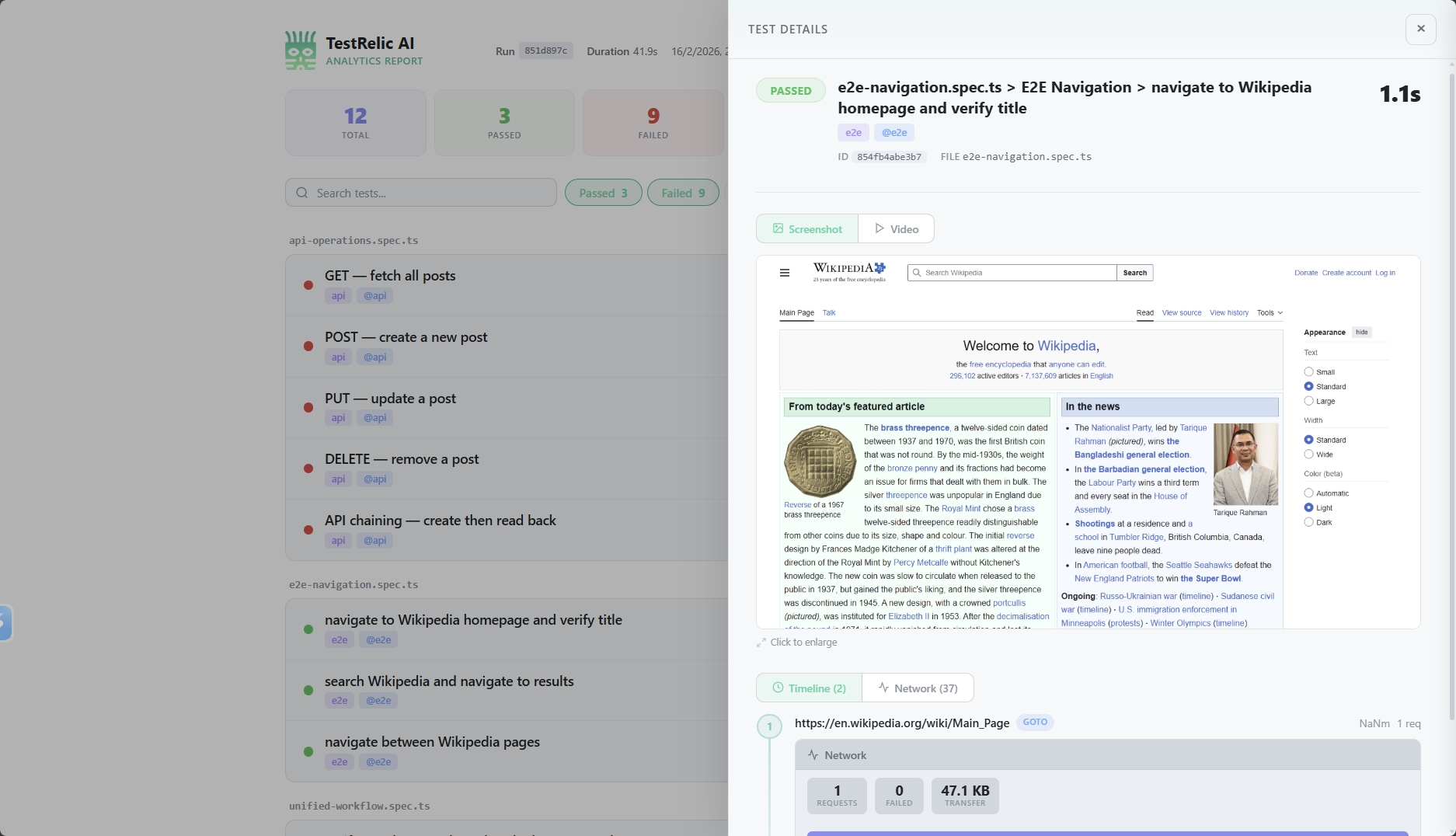
Browser test reports from TestRelic provide analytics about your E2E tests, including a navigation timeline, network statistics per page visit, test results, and failure diagnostics — all written to a single JSON file.
What does a browser test report contain?
When you run E2E tests with the TestRelic reporter and fixture, a JSON file is generated containing:
- Navigation Timeline — Every URL visited during each test, in chronological order
- Network Statistics — Request counts, bytes transferred, and resource type breakdowns per navigation
- Test Results — Pass/fail/flaky/skipped status, duration, retry count, and tags
- Failure Diagnostics — Error messages, source code snippets pointing to the exact failure line, and optional stack traces
- CI Metadata — Auto-detected provider (GitHub Actions, GitLab CI, Jenkins, CircleCI) with build ID, commit SHA, and branch
What does the report schema look like?
What is the top-level structure?
{
  "schemaVersion": "1.0.0",
  "testRunId": "797128f5-c86d-466c-8d6d-8ec62dfc70b6",
  "startedAt": "2026-02-07T10:41:28.759Z",
  "completedAt": "2026-02-07T10:41:36.794Z",
  "totalDuration": 8035,
  "summary": {
    "total": 6,
    "passed": 5,
    "failed": 1,
    "flaky": 0,
    "skipped": 0
  },
  "ci": {
    "provider": "github-actions",
    "buildId": "12345678",
    "commitSha": "abc123def456",
    "branch": "main"
  },
  "timeline": [...]
}
What fields does the top-level object contain?
| Field | Type | Description |
|---|---|---|
schemaVersion | string | Report format version |
testRunId | string | Auto-generated UUID for this run (overridable via config) |
startedAt | string | ISO timestamp when the run started |
completedAt | string | ISO timestamp when the run completed |
totalDuration | number | Total run duration in milliseconds |
summary | object | Counts of total, passed, failed, flaky, and skipped tests |
ci | object | null | Auto-detected CI environment details, or null if not in CI |
timeline | array | Chronological list of page navigations with associated tests |
What does the navigation timeline look like?
The timeline array is the core of the report. Each entry represents a single page navigation:
{
  "url": "https://en.wikipedia.org/wiki/Main_Page",
  "navigationType": "goto",
  "visitedAt": "2026-02-07T10:41:29.844Z",
  "duration": 216,
  "specFile": "tests/homepage.spec.ts",
  "domContentLoadedAt": "2026-02-07T10:41:30.200Z",
  "networkStats": {
    "totalRequests": 40,
    "failedRequests": 0,
    "totalBytes": 1289736,
    "byType": {
      "xhr": 0,
      "document": 1,
      "script": 9,
      "stylesheet": 2,
      "image": 27,
      "font": 2,
      "other": 0
    }
  },
  "tests": [
    {
      "title": "homepage.spec.ts > Homepage > loads correctly",
      "status": "passed",
      "duration": 1028,
      "failure": null
    }
  ]
}
What fields does each timeline entry contain?
| Field | Type | Description |
|---|---|---|
url | string | The visited URL |
navigationType | string | How the navigation occurred (see table below) |
visitedAt | string | ISO timestamp when the navigation started |
duration | number | Time in milliseconds to complete the navigation |
specFile | string | Path to the test file that triggered this navigation |
domContentLoadedAt | string | ISO timestamp when the DOM finished parsing |
networkStats | object | Network request summary for this page visit |
tests | array | Test results associated with this navigation |
What navigation types does TestRelic detect?
| Type | Description | Triggered by |
|---|---|---|
goto | Explicit navigation call | page.goto() |
link_click | Navigation from clicking a link | page.click('a') |
back | Browser back navigation | page.goBack() |
forward | Browser forward navigation | page.goForward() |
spa_route | Single-page app route change | Client-side routing |
hash_change | URL hash change | Anchor link click or location.hash change |
What does the networkStats object contain?
| Field | Type | Description |
|---|---|---|
totalRequests | number | Total number of network requests for this page |
failedRequests | number | Number of failed requests (4xx, 5xx) |
totalBytes | number | Total bytes transferred |
byType | object | Breakdown of request counts by resource type |
Resource types tracked in byType: document, script, stylesheet, image, font, xhr, other.
What does each test result inside a timeline entry contain?
| Field | Type | Description |
|---|---|---|
title | string | Full test title including file and suite |
status | string | Result: passed, failed, flaky, or skipped |
duration | number | Test execution time in milliseconds |
failure | object | null | Error details if the test failed; null otherwise |
When failure is present:
{
  "failure": {
    "message": "Timeout 30000ms exceeded.",
    "snippet": {
      "file": "tests/homepage.spec.ts",
      "line": 15,
      "lines": [
        "  test('homepage loads', async ({ page }) => {",
        "    await page.goto('https://example.com');",
        ">>> await expect(page.locator('.missing')).toBeVisible();",
        "  });"
      ]
    },
    "stack": "Error: Timeout 30000ms exceeded.\n    at ..."
  }
}
The >>> marker indicates the exact line where the error occurred.
How does CI integration work?
TestRelic automatically detects your CI environment and captures:
- GitHub Actions — workflow run ID, commit SHA, branch, PR number
- GitLab CI — pipeline ID, job ID, commit SHA, branch
- Jenkins — build number, commit SHA, branch
- CircleCI — build number, workflow ID, commit SHA, branch
If not running in CI, the ci field will be null.
How do I analyze browser reports?
- For AI agents
- For Human
Analyze with an AI assistant
AI Prompt — Summarize a browser report
Read my TestRelic browser report at test-results/analytics-timeline.json and:
1. Print the test summary (total, passed, failed, flaky, skipped)
2. List the 5 slowest page navigations (url + duration)
3. List all failed tests with their error messages
4. Show total bytes transferred across all navigations
Write a Node.js script that does all of this. Use fs.readFileSync and console.log.
AI Prompt — jq queries for a browser report
Write jq commands for my TestRelic browser report (test-results/analytics-timeline.json) to:
1. Print the summary object
2. List all timeline entries with url and duration
3. Find all failed tests
4. Find pages that transferred more than 1MB
5. Calculate the average navigation duration
AI Prompt — CI quality gate script
Write a bash script that reads my TestRelic report (test-results/analytics-timeline.json)
and exits with code 1 if summary.failed > 0, printing the number of failures.
Use jq. The script should be suitable for a GitHub Actions step.
How do I query reports with jq?
# View summary
cat test-results/analytics-timeline.json | jq '.summary'

# List all timeline entries (url + navigationType)
cat test-results/analytics-timeline.json | jq '.timeline[] | {url, navigationType, duration}'

# Find failed tests
cat test-results/analytics-timeline.json | jq '.timeline[].tests[] | select(.status == "failed")'

# Get navigation timeline for all entries
cat test-results/analytics-timeline.json | jq '.timeline[] | {url, navigationType, visitedAt}'

# Calculate average navigation duration
cat test-results/analytics-timeline.json | jq '[.timeline[].duration] | add / length'

# Get network stats per page
cat test-results/analytics-timeline.json | jq '.timeline[] | {url, totalRequests: .networkStats.totalRequests, totalBytes: .networkStats.totalBytes}'

# Find pages with failed requests
cat test-results/analytics-timeline.json | jq '.timeline[] | select(.networkStats.failedRequests > 0)'
How do I analyze reports programmatically in Node.js?
const fs = require('fs');

const report = JSON.parse(
  fs.readFileSync('test-results/analytics-timeline.json', 'utf-8')
);

// Summary
console.log('Test Summary:', report.summary);

// Find slowest navigations
const slowest = report.timeline
  .sort((a, b) => b.duration - a.duration)
  .slice(0, 5)
  .map(t => ({ url: t.url, duration: t.duration }));
console.log('Slowest Navigations:', slowest);

// Find failed tests
const failed = report.timeline
  .flatMap(entry => entry.tests)
  .filter(t => t.status === 'failed');
console.log('Failed Tests:', failed.map(t => t.title));

// Network stats summary
const totalBytes = report.timeline
  .reduce((sum, entry) => sum + entry.networkStats.totalBytes, 0);
console.log(`Total bytes transferred: ${totalBytes}`);
How do I analyze reports in Python?
import json

with open('test-results/analytics-timeline.json', 'r') as f:
    report = json.load(f)

# Summary
print(f"Passed: {report['summary']['passed']}")
print(f"Failed: {report['summary']['failed']}")

# Average navigation duration
durations = [entry['duration'] for entry in report['timeline']]
if durations:
    print(f"Average navigation duration: {sum(durations) / len(durations):.2f}ms")

# Failed tests
failed = [
    t for entry in report['timeline']
    for t in entry['tests'] if t['status'] == 'failed'
]
for test in failed:
    print(f"FAILED: {test['title']}")
    if test['failure']:
        print(f"  Error: {test['failure']['message']}")
What are the best practices for using browser reports?
How do I track performance trends over time?
Archive reports with timestamps after each run:
cp test-results/analytics-timeline.json \
   reports/$(date +%Y%m%d-%H%M%S)-report.json
How do I integrate report analysis into CI/CD?
# .github/workflows/test.yml
- name: Run Tests
  run: npx playwright test

- name: Check for failures
  run: |
    FAILED=$(jq '.summary.failed' test-results/analytics-timeline.json)
    if [ "$FAILED" -gt 0 ]; then
      echo "Tests failed: $FAILED"
      exit 1
    fi
Where do I go next?
- 📖 API Report Structure — Understand API test reports
- 📖 Unified Report Structure — Combined E2E + API reports
- 📖 E2E Testing Guide — Writing browser tests
- ⚙️ Playwright Configuration — Playwright reporter options
Loading chart…